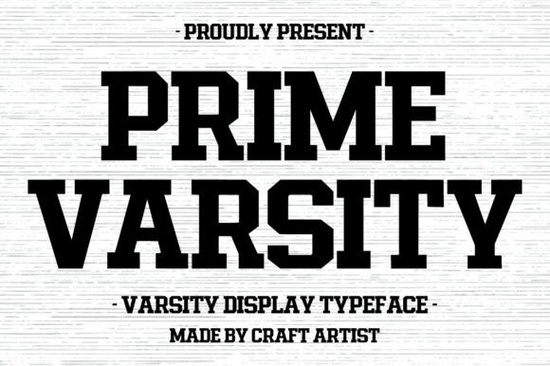
If you are working on athletic branding, school merchandise, or retro streetwear, you need lettering that reads clearly from across the room. The Prime Varsity Font delivers exactly that with heavy strokes and sharp, blocky serifs that instantly communicate team spirit and classic school pride. It sits squarely in the display category, which means it works best for headlines, logos, and large print runs rather than body paragraphs. When applied to jerseys, posters, or apparel tags, the thick structure stays crisp even at large scales. Prime Varsity handles cut files and layered designs smoothly, making it a reliable choice for both digital layouts and physical production.
What makes this typeface work for sports and vintage designs?
The design pulls straight from traditional collegiate lettering, stripping away unnecessary flourishes to focus on impact. Each character carries consistent weight and tight spacing, so words lock together into solid blocks of color. That structure matters when printing on curved fabrics or cutting vinyl for window graphics. You get clean geometric serifs that anchor the letters without feeling heavy. If you usually reach for rounded scripts when working on nostalgic projects, switching to a structured display face gives your layout immediate authority. Crafters using heat transfer vinyl will appreciate how the uniform strokes prevent small gaps from breaking during the peel. Shop owners running print-on-demand businesses notice how the thick terminals survive low-resolution mockup generators while staying sharp on final products.
How can I use it in real projects?
Because it is optimized for short text and strong visual hierarchy, keep your word count low and let the letters do the talking. Team rosters, tournament brackets, and club patches work best in all caps. For apparel tags or event invitations, mix it with a clean sans serif at a medium weight. The default spacing is already tight, so you rarely need to adjust tracking unless working at smaller sizes. Designers in illustration software can apply outline effects or drop shadows without distorting the shapes. You can layer it over textured backgrounds like brushed cotton, and the contrast will still carry through. Always outline text before screen printing so curves translate accurately across color separations.
Which design styles pair well with blocky collegiate lettering?
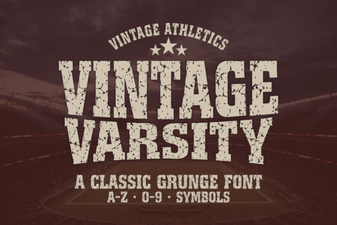
Collegiate type thrives when it shares space with contrasting elements. A geometric sans serif balances the heavy structure and keeps descriptions readable. If you want a softer vintage feel, worn textures can offset the sharp edges. Designers often pair bold display faces with rounded alternatives to create rhythm in posters. For a warmer nostalgic sweep, checking out styles like Mila helps soften layouts. When branding leans toward heritage or outdoor themes, rustic alternatives like the Rustic Cowboy add earthy character. Stick to classic athletic vibes by referencing the Vintage Varsity collection for layout ideas. If your client wants a modern streetwear edge, combining sharp lettering with playful scripts like Strawberry Milkshake creates interesting tension. For tighter spacing and cleaner shapes, the Broklyn Varsity series offers a reliable parallel.
What should I check before printing or publishing?
Large display faces reveal spacing errors quickly, so preview at one hundred percent before exporting. Check kerning around narrow letters like I and L to prevent white gaps. Verify that line weights match your printing method before sending files out. Screen printing handles thick shapes well, but direct-to-garment methods can blur fine details if resolution drops. Crafters should simplify complex layers and convert text to outlines. Review commercial licensing terms if your design includes team logos or trademarked mascots. Keep an editable file with live text handy for future wording changes. Test a printed sample on your exact material, since fabric stretch and ink absorption can shift visual weight.
Before you finalize your design, run through a quick quality check to catch common print and layout issues early:
- Preview at actual size: Zoom to one hundred percent and look for uneven spacing or overlapping serifs.
- Outline all text: Convert lettering to paths so your cutting machine or printer renders the curves exactly.
- Test on the real material: Print a single proof on cotton, vinyl, or paper to see how ink or cut lines behave on thick strokes.
- Keep it short: Limit headlines to three or four words so the heavy letterforms remain legible from a distance.
- Check licensing limits: Confirm commercial terms before listing designs on marketplaces or using them for client work.
Save this checklist in your project notes, and keep it handy for every new layout. It takes less than two minutes to run through these steps, and it prevents costly reprints or file corrections later on.
Explore Design Rabbit Hole Font: Creative Inspiration & Typography Ideas
 Retro Typography for Modern Design Projects
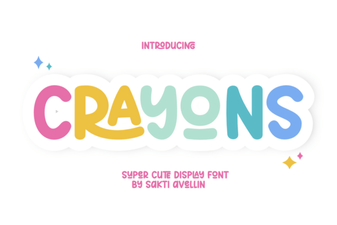 A Creative Font to Color Your Designs
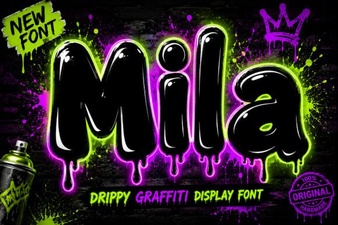 Mila Font: a Modern Approach to Clean Design
 Girly Pop Fonts for Creative Design Projects
 Creative Fonts for Your Beautiful Handwriting Designs